Can’t Explode Block in CAD? To resolve problems with exploding a block in CAD, check the block’s properties and explode settings. Ensure that the block is not set as non-explodable in its definition.
Exploding a block in Computer-Aided Design (CAD) software can encounter issues if the block was created with restrictions or the explode feature has been disabled. Computer-Aided Design programs like AutoCAD equip users with the ability to compile individual elements into a single block entity.
This entity simplifies the management and manipulation of related components within a drawing. When you can’t explode a block, it typically indicates that the block is designed to prevent disassembly, possibly to maintain the integrity of the design or to protect proprietary elements within the block.
Understanding the underlying properties and restrictions of the block can offer insights into why the explode function may not be working. Troubleshooting these issues requires a closer examination of the block’s parameters and accessing the appropriate settings to enable the explode function.
Why Blocks May Fail To Explode
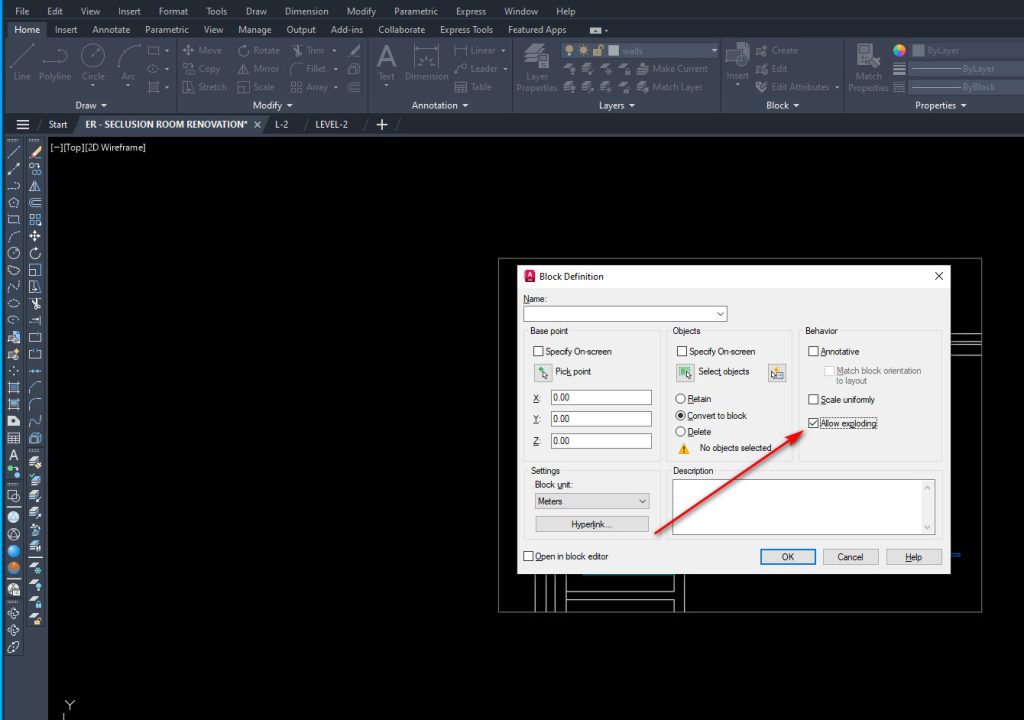
Blocks in CAD may resist exploding due to specific reasons. Incompatible block types often lead to such issues. A block might contain elements that do not support the explode function. Also, if a block has been set to non-explodable by the creator, it won’t break apart. This restriction is sometimes intentional to preserve the block’s integrity.
Another common snag is nested blocks, which are blocks within blocks. These can create complexities during the explode process. If the parent block explodes, it might leave nested blocks intact. To fully explode such instances, each nested block must be individually exploded. It can be time-consuming but necessary to achieve the desired results.
Common Issues When Exploding Blocks
Exploding blocks in CAD can cause unexpected changes.
Block attributes often get lost during the process. Attributes like text tags might disappear. This leads to extra work, as you need to restore or redo them.
The original scaling of blocks might not stay the same after an explode action. You could see blocks appear too big or too small. Fixing this requires adjusting the scale of each block manually.
Tips For Successfully Exploding Blocks
Having trouble exploding blocks in CAD? Here’s a quick guide for smooth operations. Firstly, check for nested blocks within your main block. It’s like looking for a box inside another box. Make sure any inner blocks are exploded separately.
Next, confirm your block isn’t an external reference (Xref) or proxy entity. These types cannot be exploded directly. They are linked to other files and not part of your drawing.
Lastly, verify the compatibility of the block types in your CAD version. Some blocks might not explode due to version restrictions or custom protections set by the creator.
Alternative Methods To Explode Blocks
To explode a block in CAD, the ‘Burst’ command outputs an interesting result. Select the block and type ‘Burst’ in the command line. Hit Enter. This operation retains block attributes. It turns blocks into simple components.
For changing a block, opt for detaching and modifying. First, detach the block from the drawing. Select the block, then find the detach option. After detaching, individual elements can be edited. It’s similar to exploding but provides more control over changes.
Frequently Asked Questions On Can’t Explode Block In Cad
Why Can’t I Explode A Block In Cad?
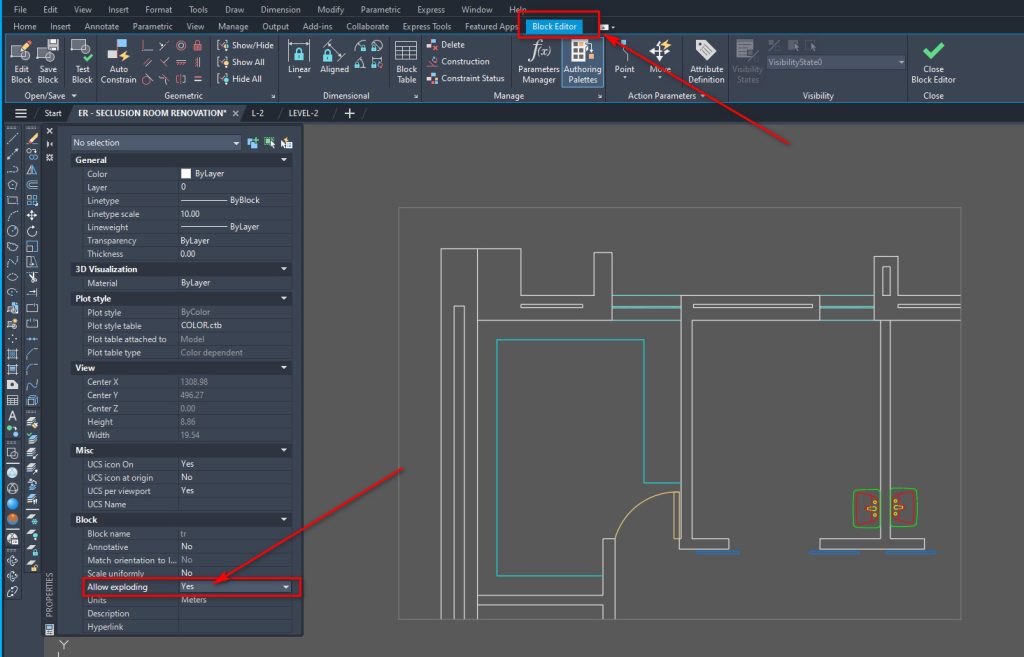
Sometimes blocks cannot be exploded due to them being set as non-explodable upon creation. Check the block’s properties or recreate it without the non-explodable option.
How To Explode Non-explodable Blocks In Cad?
To explode non-explodable blocks, you may need to edit the block definition to allow exploding, or use the BURST command, which explodes blocks while maintaining attribute data.
What Are The Causes Of Explode Command Failure In Cad?
Common causes include blocks created with the ‘Allow Exploding’ option unchecked, or blocks containing attributes that aren’t set up to be exploded.
Are There Alternatives To The Explode Command In Cad?
Yes, alternatives include the BURST command for maintaining attributes, or REFEDIT to temporarily edit block components without exploding.
Conclusion
Wrapping up, mastering the nuances of CAD systems enhances your design efficiency. Remember, blocks are crucial, yet tricky, elements within CAD. Overcoming challenges like block explosions is doable with the right techniques. Keep honing your skills, and soon, you’ll navigate through CAD issues with ease, boosting your productivity and precision on all future projects.
