
Sliding Door CAD Block (DWG) – Left, Right & Double Opening | Free Download
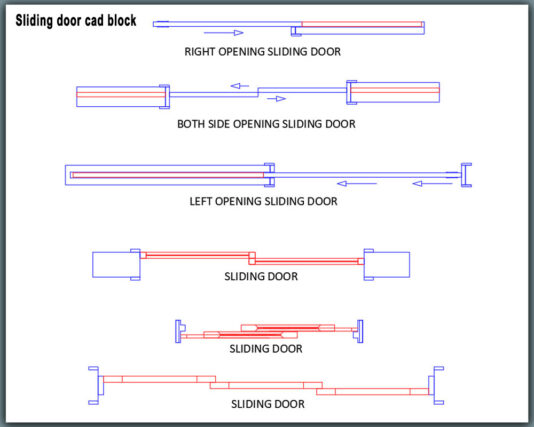
Sliding Door CAD Block is a ready-to-use DWG solution for placing accurate sliding doors in architectural drawings without repetitive drafting. This free sliding door CAD block includes left-side opening, right-side opening, and double sliding door options, suitable for both residential and commercial layouts.
These sliding door DWG blocks are created with clean layers, correct scale, and professional line quality, making them ideal for AutoCAD and all DWG-compatible software. You can quickly insert the block into floor plans, layouts, and interior drawings while maintaining drawing consistency and accuracy.
📦 What You’ll Get
-
Sliding door CAD block – left side opening
-
Sliding door CAD block – right side opening
-
Double sliding door (both sides opening)
-
Properly scaled DWG file
-
Clean layers for easy editing
🎯 Where You Can Use This Sliding Door CAD Block
-
Office floor plans
-
Apartment and residential layouts
-
Shopping centers and showrooms
-
Clinics, hospitals, and commercial interiors
-
Meeting rooms and workspace designs
To complete full workspace layouts, you may also explore our highlighted Office Furniture CAD Blocks for matching desks, chairs, and layout elements.
💡 Why Choose This Sliding Door DWG Block
-
Saves drafting and detailing time
-
Works smoothly with AutoCAD and DWG software
-
Easy to modify for custom designs
-
Suitable for professional construction drawings
❓ FAQ
Is this sliding door CAD block free?
Yes, it is completely free to download and use.
Which AutoCAD versions are supported?
Compatible with all standard AutoCAD and DWG-supported software.
Can I use it for commercial projects?
Yes, it can be used in both residential and commercial drawings.
👉 Download the sliding door CAD block now and speed up your drafting workflow instantly.
More related downloads:
➡️ Meeting Room CAD Block