
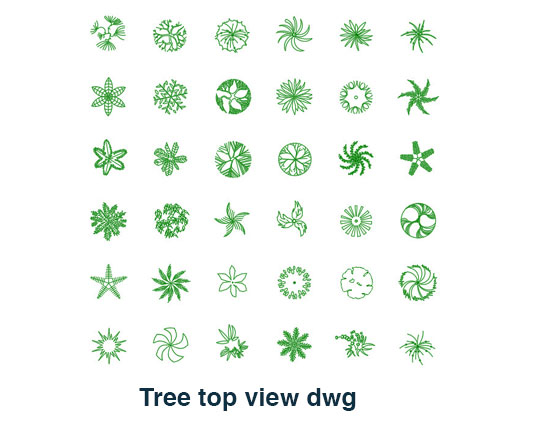
Tree Top View DWG Free AutoCAD Landscape CAD Block
tree top view dwg is a ready-to-use CAD block that shows the plan or overhead representation of a tree for landscape, architectural, and site drawing applications. It is a practical resource for adding clear tree symbols to drawings without creating each element manually.
Ideal for site and landscape drawings
This tree CAD block can be used in landscape plans, garden layouts, site plans, residential projects, commercial developments, parks, public spaces, and architectural presentation drawings. The top view representation is useful when trees need to be shown as part of an overall site arrangement or planting layout.
Instead of drawing branches, foliage, and the overall tree shape from scratch, you can insert the prepared block directly into your project. Its editable CAD format allows you to position and adjust the element according to the scale and layout of your drawing.
Quick CAD resource
- Tree representation in top/plan view
- Useful for landscape and site plans
- Suitable for architectural drawings
- Editable DWG CAD format
- Easy to copy and reuse
- Useful for building a landscape CAD library
The drawing works well for both detailed technical plans and general architectural presentations where vegetation needs to be represented clearly. You can place multiple tree blocks across a site plan to indicate landscape areas, garden zones, pathways, open spaces, or planting locations.
The file is provided in DWG format and is compatible with AutoCAD and other DWG-compatible CAD software. You can edit, move, scale, duplicate, and incorporate the block into your existing drawing workflow without rebuilding the basic tree graphic.
For designers working with different landscape elements, you can also add our Flower Elevation CAD Block to your collection. Combining different vegetation and landscape CAD resources can make site-plan drafting quicker and help keep graphical elements consistent throughout a project.
Save drafting time
A ready-made tree symbol is useful when several landscape elements are required on the same drawing. Reusing a prepared block reduces repetitive CAD work and gives you a consistent representation across multiple plans. It also allows you to focus more on arranging the site rather than repeatedly drawing basic vegetation symbols.
Keep this resource in your CAD library for future architectural, landscape, garden, and site-planning projects. It is a simple and practical block for anyone who regularly prepares professional CAD drawings.
Download the tree top view dwg free today. Add this useful tree CAD block to your collection and make your next landscape or site plan faster and easier to prepare.