
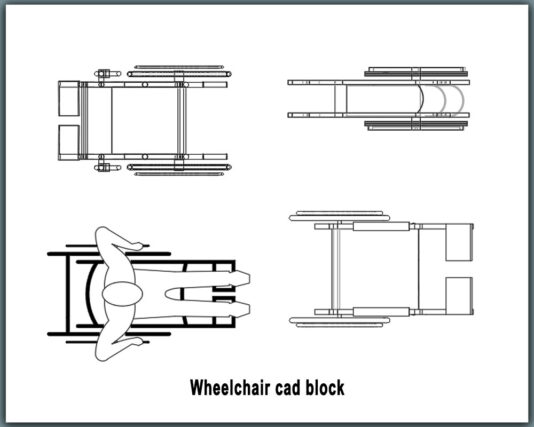
Wheelchair CAD Block – Editable DWG for AutoCAD
Designing inclusive and accessible spaces is no longer optional—it’s a core requirement in modern architecture and interior planning. A professionally prepared wheelchair cad block helps designers accurately represent accessibility elements in drawings without wasting time on manual drafting. Whether you are working on hospitals, public buildings, residential projects, or commercial layouts, having a precise wheelchair representation improves both technical accuracy and visual clarity.
This CAD block is created for real-world architectural and engineering use. It reflects correct proportions and standard dimensions commonly required for accessibility planning, circulation analysis, and furniture layout drawings. Instead of sketching approximate symbols, you can insert a ready-made wheelchair block that fits seamlessly into your plan.
The file works smoothly in AutoCAD and similar software, allowing you to maintain professional standards across all drawings. Just as designers rely on elements like the Basketball Court CAD Block for sports layouts, this block becomes an essential asset for accessibility-focused projects.
What You’ll Get
-
Precisely drawn wheelchair symbol with realistic proportions
-
Clean, lightweight wheelchair dwg file
-
Organized layers for easy control and visibility
-
Fully editable geometry (scale, rotate, modify freely)
-
Compatible with AutoCAD and other DWG-supported software
-
Ready-to-use asset for plans, layouts, and detail drawings
Who Can Benefit
This CAD block is ideal for architects, interior designers, civil engineers, and CAD draftsmen involved in accessibility-compliant projects. It is especially useful for professionals working on hospitals, clinics, schools, shopping malls, airports, and public facilities where universal design is required. Freelancers, students, and consultants preparing approval drawings or design presentations will also find this block extremely helpful. Anyone who needs to show wheelchair movement, clearance, or user presence in drawings can benefit from this resource.
Why Choose This DWG Block
Accuracy and usability are the key advantages of this DWG block. The wheelchair representation is drawn to scale, making it suitable for circulation studies, space planning, and accessibility checks. Because the file is fully editable, you can adjust size, line weight, or orientation based on project needs. It works seamlessly wheelchair in autocad environments without file conversion or compatibility issues.
The block is clean and professionally structured—no unnecessary details, no broken lines, and no messy layers. This keeps your drawings lightweight and easy to manage, even in large projects. Using a high-quality wheelchair cad block also helps maintain consistency across multiple drawings, ensuring your documentation looks professional and meets design standards.
Download now and enhance your CAD library with a reliable, editable wheelchair DWG block—perfect for accessible, professional, and efficient design workflows.
1 thought on “Wheelchair CAD Block | Professional DWG Download”
Pingback: Septic Tank CAD Block for Residential & Commercial Use - PinCad